建立部落格貼文
在部落格貼文中,您會圍繞主題或關鍵字撰寫內容,加以格式設定並新增相片。現在剩下的就是立即發布或在稍後排程。不確定該說什麼?草稿版本會自動儲存,因此,您可以寫下一個簡單的想法,等您準備好完成。記得記得在網站上新增部落格區段才能顯示貼文。
本影片屬於為企業經營部落格教學系列。
- 前往您的GoDaddy產品頁面。
- 向下捲動並展開Websites + Marketing ,然後點選網站旁邊的「管理」 。
- 展開儀表板的「行銷」 ,然後選擇「部落格」 。
- 點選建立貼文。
- You can choose to have artificial intelligence (AI) generate a post for you, or create one yourself.
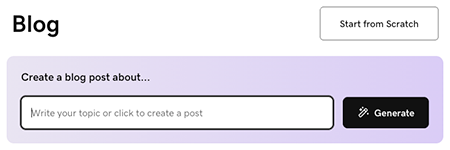
To have AI generate a post for you:
- Enter a topic or short description to guide what the blog post is about, or simply select Generate to allow the AI to generate a post based on what it knows about your business.
- The AI will generate a blog post and display it for you to preview. Use the chat interface to make changes, if needed, or select Edit under the blog post preview to manually edit the post.
To write a post yourself, select Start from Scratch and follow these steps:
- Start with the title. It should contain your main idea keyword and give readers an idea of the benefit they'll get from reading your article. Your title must be less than 65 characters.
- Add the body text. Write in a conversational tone and use headers to separate ideas. Highlight text to format and link it.
- With your cursor in the text area, select
 add to add images, video or a divider. Add a stock image or video, or one of your own images or videos. Learn more about creating a professional-looking image.
 - Add your featured image. It will show in your post and in the blog section of your website.
- Pick a category or add a new one. Categories allow you to create multiple blogs on your website.
Note: To delete a divider line, select the line and press the backspace or delete key on your keyboard. - Select Publish Now to publish your blog post immediately, or select Schedule, and then select a date and time when you want the blog post to be automatically published.
- To complete the process, select Publish Now.
部落格貼文最佳實踐
These videos are part of the How-To series for Using a Blog for Your Business.
更多資訊
- You've created a post! Now it's time to add a blog post section to your website.